


Redesigning a website is more than just a cosmetic update. It’s an opportunity to improve user experience, update branding, enhance technical performance, and align your site with modern SEO practices. However, a website redesign can also be risky. Without proper planning, it can lead to broken links, lost traffic, and a drop in search engine rankings.
At KTPL – Business Growth Agency, we’ve seen many businesses stumble during a website redesign because they focused solely on design and functionality while neglecting SEO. In this comprehensive guide, we’ll provide a step-by-step website redesign checklist that ensures your site is visually refreshed, fully functional, and retains its search engine authority.
Why SEO Matters During a Website Redesign
- Broken internal links
- Lost backlinks due to missing pages
- Drop in organic traffic from URL changes
- Slow page load times impacting user experience and rankings
- Mobile-unfriendly designs
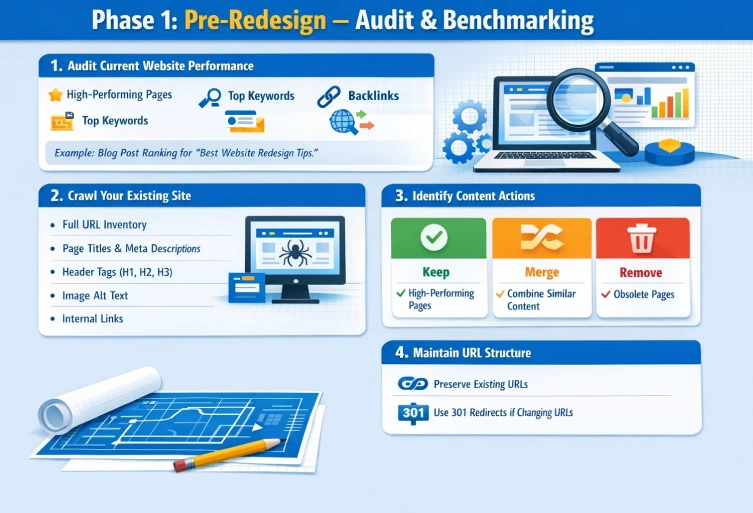
Phase 1: Pre-Redesign – Audit & Benchmarking
The first phase of a website redesign is preparation. Think of this as creating a blueprint for a house renovation—you want to know what works, what needs improvement, and what must be preserved.
1. Audit Current Website Performance
- High-performing pages: Identify pages that generate the most traffic or conversions.
- Top keywords: Document the keywords that bring organic traffic.
- Backlinks: Track inbound links to ensure they are not lost during URL changes.
- Traffic sources: Understand where your audience comes from and which channels are most effective.
Example: If a blog post ranks on page 1 for “best website redesign tips,” you’ll want to ensure that page’s content, URL, and metadata are preserved to maintain rankings.
2. Crawl Your Existing Website
- All URLs
- Page titles and meta descriptions
- Header tags (H1, H2, H3)
- Image alt text
- Internal linking structure
3. Identify Content to Keep, Merge, or Remove
- Keep: High-performing pages with traffic and backlinks.
- Merge: Combine low-performing pages on similar topics to create stronger, more authoritative content.
- Remove: Obsolete pages with little value, but ensure proper 301 redirects point them to relevant new pages.
4. Maintain URL Structure Whenever Possible
Changing URLs unnecessarily can harm your SEO. Preserve existing URLs wherever possible, and if you must change them, implement 301 redirects to pass ranking authority to new pages.
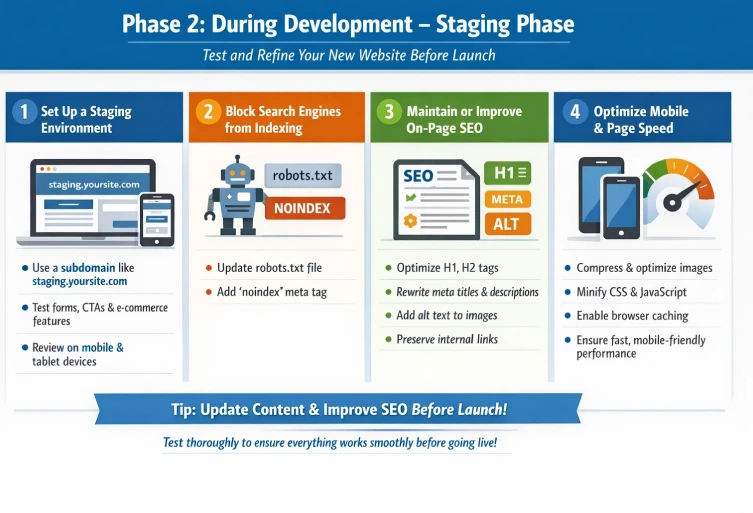
Phase 2: During Development – Staging Phase
Once you have your audit completed and a plan in place, it’s time to develop the new site. A staging environment is critical to test your redesign safely.
1. Set Up a Staging Environment
- Use a subdomain like staging.yoursite.com
- Test all interactive elements such as forms, CTAs, and e-commerce functionality
- Review responsive design on mobile and tablet devices
2. Block Search Engines from Indexing
Make sure search engines do not index your staging site by updating robots.txt or adding a “noindex” meta tag. This prevents duplicate content issues that can affect SEO.
3. Maintain or Improve On-Page SEO
- H1 and H2 tags: Keep the structure logical and keyword-rich.
- Meta titles and descriptions: Rewrite or optimize them for relevancy and click-through rate.
- Alt text for images: Improves accessibility and helps image search rankings.
- Internal links: Preserve connections between pages to maintain link equity.
4. Optimize Mobile-Friendliness and Page Speed
- Compress images without losing quality
- Minify CSS and JavaScript files
- Enable browser caching
- Use a reliable hosting provider for optimal load times
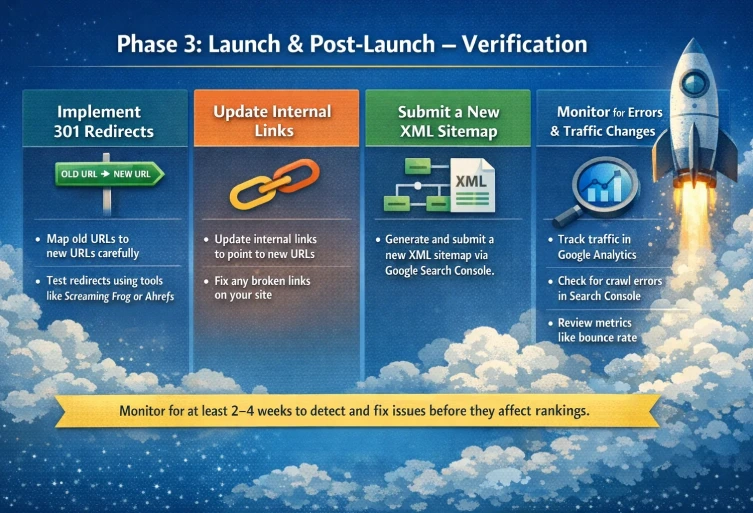
Phase 3: Launch & Post-Launch – Verification
After testing and refinement, your website is ready to go live. The launch phase is critical to ensure SEO continuity.
1. Implement 301 Redirects
- Map old URLs to new URLs carefully
- Test redirects using tools like Screaming Frog or Ahrefs
2. Update Internal Links
Update any internal links that point to old URLs to match your new structure. Broken internal links can negatively affect user experience and SEO.
3. Submit a New XML Sitemap
Generate a new XML sitemap and submit it via Google Search Console. This helps search engines crawl and index your new site efficiently.
4. Monitor for Errors and Traffic Changes
- Track organic traffic in Google Analytics
- Check for crawl errors and broken links in Search Console
- Review user engagement metrics like bounce rate and time on page
Advanced Tips for a Successful Website Redesign
- Content Consistency: Don’t remove high-ranking content unless it’s consolidated properly.
- Structured Data: Maintain or implement schema markup to improve search visibility.
- Analytics Tracking: Ensure all tracking codes, tags, and conversion pixels are transferred correctly.
- Test Forms and CTAs: Broken forms or calls-to-action can affect conversions and user experience.
- SEO Audit Post-Launch: Conduct a full audit 2–4 weeks after launch to ensure all redirects, metadata, and technical optimizations are intact.
Common Mistakes to Avoid During a Website Redesign
- Neglecting SEO in favor of design: Beautiful design alone doesn’t generate traffic.
- Changing URLs without proper redirects: This can result in lost backlinks and rankings.
- Blocking Google indexing for too long: Delays in indexing can slow traffic recovery.
- Ignoring mobile optimization: Mobile-friendly design is essential for modern SEO.
- Failing to monitor post-launch: Unnoticed errors can quickly affect user experience and SEO performance.
Final Thoughts
A website redesign is more than an aesthetic upgrade—it’s a strategic opportunity to enhance your brand, usability, and technical performance. By following this website redesign checklist, businesses can ensure that their redesign improves user experience while protecting SEO value.
At KTPL – Business Growth Agency, we specialize in website redesigns that balance creativity, functionality, and search engine optimization. With careful planning, detailed audits, and post-launch monitoring, your redesigned site can achieve higher rankings, increased traffic, and better user engagement.
A successful website redesign is not just about how your site looks—it’s about how well it performs. Follow these steps, and your next redesign will be a growth-driving success.
FAQs
Have questions? We’ve answered some of the most common queries to help you understand the topic better
Q1. How long should I monitor SEO after a website redesign?
At least 4 weeks post-launch. This period allows you to identify and fix crawl errors, broken links, or traffic drops.
Q2. Will redesigning my website hurt my rankings?
Not if done correctly. Maintaining metadata, using proper redirects, and preserving content ensures rankings remain stable or improve.
Q3. Should I change the URL structure during redesign?
Only if necessary. Always implement 301 redirects for any changed URLs to transfer ranking power.
Q4. How do I improve page speed during a redesign?
Optimize images, minify CSS/JS, enable caching, and use a reliable hosting service.
Q5. Why is mobile optimization critical?
Google uses mobile-first indexing. A responsive, mobile-friendly website improves rankings and user experience.
Want To Grow Your Business - Connect With KTPL
KTPL – Business Growth Agency, a creative solutions and business growth agency from India.
👉 Visit https://kirnanitechnologies.com
📞 Call us at +91 95093 33000
📧 Email us at contact@kirnanitechnologies.com


