


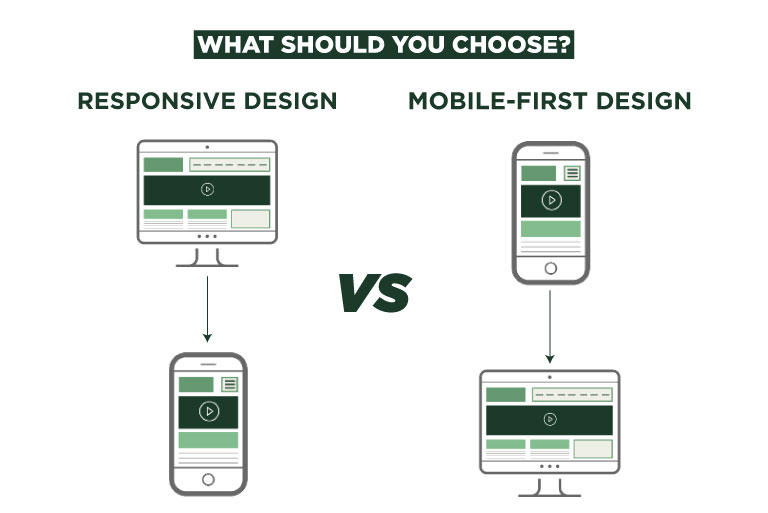
- Responsive Design
- Mobile-First Design
What is Responsive Design?
Responsive Design is a web design approach that automatically adjusts a website’s layout and content based on the screen size. The goal is to ensure that users have a seamless experience whether they’re on a desktop, tablet, or smartphone.
How It Works:
- The website is first designed for larger screens (like desktops).
- Using CSS media queries, the layout resizes or rearranges itself based on the screen width.
- The same content is delivered to all devices, just presented differently.
What is Mobile-First Design?
Mobile-First Design flips the process. As the name suggests, the website is first designed for mobile devices, then gradually improved for larger screens like tablets and desktops.
How It Works:
- Designers start with the smallest screen (usually a smartphone).
- Core features are built and optimized for mobile users.
- As the screen size increases, additional features and enhancements are added.
Responsive vs Mobile-First: Key Differences
Feature | Responsive Design | Mobile-First Design |
Approach | Desktop-first | Mobile-first |
Design Process | Starts with full desktop layout | Starts with minimal mobile layout |
Performance on Mobile | May load unnecessary desktop content | Optimized for speed and performance |
SEO Benefits | Good | Better (thanks to mobile-first indexing) |
Best For | Existing websites needing mobile support | New websites with a mobile-first audience |
Pros and Cons of Each Approach
Understand the benefits and drawbacks of both methods to decide which suits your website’s purpose, audience behavior, and technical capacity.
Responsive Design – Pros:
- Easier to implement for existing websites.
- Uses one URL and one codebase for all devices.
- Compatible with most CMS platforms like WordPress, Shopify, etc.
Responsive Design – Cons:
- Slower load times on mobile if not optimized.
- Desktop-focused layout may not be ideal for small screens.
- May include unnecessary elements on mobile.
Mobile-First Design – Pros:
- Prioritizes mobile users, who are the majority.
- Improves speed, UX, and Core Web Vitals.
- Cleaner code and fewer unnecessary elements.
Mobile-First Design – Cons:
- Requires more planning and development time.
- Not ideal for sites where desktop usage dominates.
- May need more effort to scale up to desktop layout.
Why Mobile-First is the Future
Google now uses mobile-first indexing, which means the mobile version of your site is the main version it evaluates for search rankings. If your mobile site is slow or hard to navigate, your search visibility suffers.
- Your website loads faster.
- You improve your user experience (UX).
- You meet Google’s standards for SEO ranking factors like speed, usability, and structure.
When to Choose Responsive Design
- You already have a desktop site that needs to be mobile-friendly.
- You’re on a tight budget or timeline.
- Your audience still mostly visits from desktops.
When to Choose Mobile-First Design
- Most of your traffic comes from mobile.
- You’re building a new site from scratch.
- You want better speed and performance.
- SEO and user experience are your top priorities.
SEO Perspective: Which One Wins?
- Faster loading times
- Better engagement
- Higher rankings on search engines
- Compressed images
- Clean code
- Mobile usability in mind
Use Cases: Which Design Suits Your Business?
Business Type | Recommended Design | Why? |
Small Business | Responsive Design | Easy to set up and budget-friendly |
eCommerce | Mobile-First Design | Mobile users = more conversions |
Blogging Site | Responsive Design | Simpler layout, less technical effort |
SaaS Product Website | Mobile-First Design | Better performance and mobile lead capture |
Final Verdict: What Should You Choose?
- Use responsive design if you want a simple solution to make your current site mobile-friendly.
- Use mobile-first design if you’re starting fresh and care deeply about SEO, speed, and user experience.
Bonus Tips for Better Mobile UX:
- Keep text large and readable on small screens.
- Use touch-friendly buttons.
- Minimize pop-ups.
- Prioritize fast loading images.
FAQs
Have questions? We’ve answered some of the most common queries to help you understand the topic better.
1. What is the difference between mobile-first and responsive design?
Mobile-first design starts with the smallest screen and adds features for larger devices. Responsive design adapts content from desktop down to smaller screens.
2. Which is better for SEO – responsive or mobile-first?
Mobile-first is better for SEO due to faster loading and Google’s mobile-first indexing.
3. Is responsive design still good in 2025?
Yes, it’s still effective, especially for existing sites, but mobile-first is more future-proof.
4. Can I change my site from responsive to mobile-first?
Yes, but it may require a full redesign with a focus on mobile user experience and performance.
5. Does Google recommend mobile-first design?
Yes, Google encourages mobile-first indexing and rewards fast, mobile-optimized websites in search rankings.
Want To Grow Your Business - Connect With KTPL
KTPL – Business Growth Agency, a creative solutions and business growth agency from India.
👉 Visit https://kirnanitechnologies.com
📞 Call us at +91 95093 33000
📧 Email us at contact@kirnanitechnologies.com


