


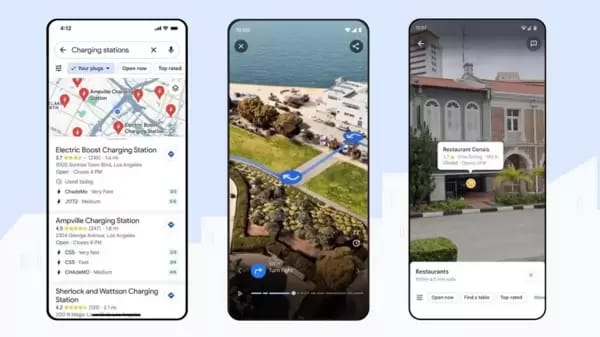
Google Maps has always been the go-to app for millions who rely on it daily for directions, local discovery, and live traffic. But in 2025, the platform is stepping into a whole new era. With the integration of Gemini AI and several India-first features, Google Maps is no longer just about routes—it’s becoming your intelligent travel companion.
Let’s explore all the new AI-powered features of Google Maps, what makes them special, and why they matter for everyday users and businesses alike.
The Evolution of Google Maps in 2025
Over the years, Google Maps has evolved from a simple navigation tool into a powerful ecosystem that blends maps, local business listings, and community-driven content. Now, with the help of artificial intelligence, the app is getting smarter, faster, and more intuitive.
Before diving into individual updates, it’s worth understanding the vision behind these changes. Google wants to make Maps feel more human. Instead of tapping, typing, or manually exploring, you’ll be able to talk to Maps like a real assistant, understand your surroundings through your camera, and even receive region-specific insights in your own language.
Gemini AI Integration — Google Maps’ New Brain
The highlight of this year’s update is the introduction of Gemini AI, Google’s advanced generative assistant that now powers parts of the Maps experience. This upgrade transforms Maps from a static navigation app into an interactive, voice-controlled navigator.
Before we move into specific tools, here’s why this integration matters. Gemini brings natural conversation abilities, smart context understanding, and multi-modal data processing (text, images, voice, and camera)—making Maps far more intelligent than before.
Conversational Navigation for Everyday Use
With Gemini AI, you can now talk to Google Maps like a co-driver. Imagine asking, “Find the best café nearby with parking” or “What’s traffic like on my way to the office?”—and getting an instant, spoken response. You don’t have to manually type or scroll anymore; the app understands intent and context.
This conversational layer makes navigation smoother and hands-free, ideal for drivers and riders. It also improves accessibility for visually challenged users or those who prefer voice interaction.
AI-Enhanced Recommendations and Trip Planning
The AI doesn’t just give directions—it also helps you plan smarter trips. For example, Gemini can suggest the best time to leave, recommend popular pit stops, or create customized travel routes based on your past journeys. Over time, it learns your preferences—whether you prefer scenic routes, toll-free paths, or the fastest drives.
This move reflects a clear trend: Google Maps is becoming a personal travel assistant, not just a GPS app.
Landmark-Based Directions and Visual Understanding
Another big leap in user experience comes from landmark-based directions and AI-powered visual search. Google has realized that people remember landmarks better than street names or numbers.
Before getting into the details, think about how you usually give directions—“turn left after the post office” or “it’s next to the petrol pump.” That’s exactly how the new Maps will guide you.
Real-World Cues Instead of Robotic Instructions
Instead of robotic voice commands like “turn right in 200 meters”, Maps will now say “turn right after the temple” or “take a left before the museum.” These landmark-based cues make navigation more intuitive and safer, especially in busy Indian cities with confusing road layouts.
Visual Search with Lens and AI Recognition
The Google Lens feature inside Maps also gets a Gemini boost. Point your phone camera at any building, restaurant, or landmark, and ask, “What is this place?” The app instantly gives details, reviews, photos, and even user ratings.
This AI-powered visual search is incredibly helpful for tourists and explorers who want to learn about their surroundings without typing or searching manually.
India-First Features Designed for Local Users
India has always been one of Google Maps’ most active markets, so the company is now testing and launching several new features here before they reach global users. These India-first AI updates make Maps more local, inclusive, and efficient.
Two-Wheeler Navatars for Indian Riders
In a country where two-wheelers dominate the roads, Google Maps now introduces Navatars—custom bike and scooter icons. These colorful avatars make navigation more fun and personalized, while also visually separating two-wheeler routes from car routes.
Voice Navigation in Indian Languages
Another major change is multi-language voice navigation. Users can now hear turn-by-turn directions in nine Indian languages, including Hindi, Tamil, Telugu, and Bengali. This improves accessibility for millions who prefer regional communication over English.
Speed Limit and Safety Alerts
Google has started showing real-time speed limits on the in-app speedometer for major cities like Mumbai, Delhi, and Hyderabad. The app will also highlight accident-prone zones and send alerts to drivers approaching high-risk areas.
This AI-driven safety system aims to reduce accidents and improve road awareness using data collected from millions of navigation sessions.
Metro Ticket Integration with Google Wallet
In collaboration with Indian metro authorities, Google Maps now lets users buy and store metro tickets directly in Google Wallet. You can purchase a Delhi Metro ticket, save it inside Wallet, and use it for entry—no physical card required.
This feature makes public commuting smoother and supports India’s push toward digital ticketing systems.
AI-Powered Insights for Businesses and Travelers
The new AI layer in Google Maps isn’t just for drivers—it also helps local businesses, delivery platforms, and frequent travelers make data-driven decisions.
Before jumping into technicalities, it’s important to note how big this is for local commerce. When AI helps people find restaurants, shops, or fuel stations faster, it directly boosts business visibility.
Personalized Discovery and Local Business Boost
Gemini AI curates location suggestions based on user intent. If you say, “Find an affordable rooftop café nearby,” Maps filters listings by price, ambience, and proximity. For business owners, this means more qualified visitors and better exposure to relevant audiences.
Smarter Trip Insights and Real-Time Data
AI-generated summaries can show real-time insights like traffic spikes, crowd density, or road conditions. This helps travelers plan smarter and avoid delays. Logistics and delivery firms can also use this AI data through Maps API for improved routing efficiency.
Why These AI Updates Matter
The AI revolution inside Google Maps isn’t just about technology—it’s about making navigation human-like. For regular users, it means less tapping and guessing. For developers and platform designers, it opens up possibilities for integration, automation, and smarter web experiences.
Before breaking down the implications, let’s understand the vision. Google is building a digital layer that blends voice, visuals, and real-time intelligence into one seamless interface.
Better User Experience and Accessibility
By using conversational commands, visual learning, and local language options, Google Maps is becoming more inclusive. It serves both tech-savvy users and those less comfortable with screens or typing.
Data-Driven Platform Integrations
Businesses and developers can integrate these new AI features into their apps and websites. For example, a delivery platform can embed real-time traffic alerts, while a tourism site can use landmark-based routing to enhance trip planning tools.
How to Make the Most of These AI Features
With all these updates rolling out gradually, users and developers can start adapting early.
Before exploring usage tips, remember that some of these features—like speed alerts or metro integration—are region-specific and will expand gradually.
Update Your App Regularly
To access the latest tools, keep your Google Maps app updated. Many AI features are rolling out in stages for Android and iOS.
Enable Location and Voice Permissions
AI navigation requires access to your microphone, camera, and GPS. Make sure permissions are on to use Lens, voice search, and safety alerts effectively.
Use Gemini Inside Google Apps
If you already use Gemini (Google’s AI chatbot), you can now ask it travel-related questions that seamlessly connect with Maps, like “Plan a weekend trip to Jaipur” or “Show me nearby vegetarian cafés.”
The Road Ahead for Google Maps and AI
Google’s latest AI-powered upgrade is only the beginning. As Gemini evolves, expect even deeper integration across Google Workspace, Android Auto, and Wear OS.
Before wrapping up, it’s worth noting the broader direction: AI is turning Google Maps into an intelligent travel network that learns from users, adapts to regions, and predicts needs in real-time.
Future Possibilities
In the near future, you might see AI-generated trip videos, 3D route previews, and even proactive alerts like “leave now to avoid rain.” The boundary between navigation and travel planning will continue to blur.
Conclusion
The latest AI-powered Google Maps features redefine how people explore, travel, and connect with the world around them. With Gemini AI at its core, Maps is no longer just a navigation tool—it’s a smart assistant that learns, adapts, and guides with human-like precision.
From landmark-based directions to regional language support and real-time safety alerts, every update reflects Google’s goal to make travel more personal, safe, and effortless. Whether you’re a commuter, traveler, or business owner, the new Google Maps brings a more intelligent, localized, and conversational experience right to your phone.
FAQs
Have questions? We’ve answered some of the most common queries to help you understand the topic better
1. What are Google Maps’ new AI-powered features?
Google Maps now uses Gemini AI for conversational navigation, visual recognition via Lens, India-first safety alerts, two-wheeler icons, and metro ticket integration.
2. How does Gemini AI improve Google Maps?
It allows users to talk naturally with Maps, get personalized recommendations, and receive smarter route planning based on real-time data.
3. Are these AI features available globally?
Most core features are rolling out worldwide, but India is getting early access to several localized tools such as multi-language navigation and metro ticketing.
4. Can businesses benefit from AI in Maps?
Yes. Local businesses gain better visibility through AI-driven search and personalized discovery, helping connect with nearby customers.
5. What should users do to access the new updates?
Keep the app updated, enable permissions, and explore the new Lens and voice navigation options powered by Gemini AI.
Want To Grow Your Business - Connect With KTPL
KTPL – Business Growth Agency, a creative solutions and business growth agency from India.
👉 Visit https://kirnanitechnologies.com
📞 Call us at +91 95093 33000
📧 Email us at contact@kirnanitechnologies.com


